
Analysis Properties
This feature is included in the Ultimate and Advanced Editions
|
Time-saving rating....
|

|
|
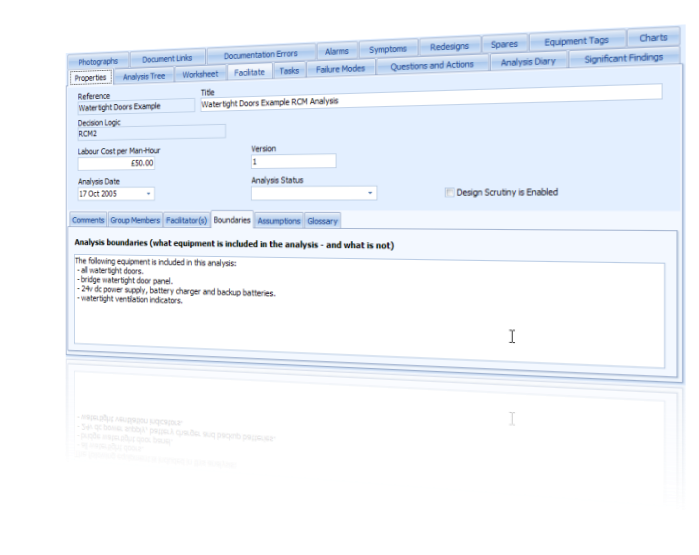
The Analysis Editor window allows the user to record a lot of information that describes, or applies to, the entire RCM analysis.
The screen is split into 2 sections:
|
|
The upper section contains the following fields:
- Reference - A mandatory unique reference for the analysis (up to 25 characters).
- Title - An optional title for the analysis (up to 50 characters).
- Decision Logic - Shows which of the available RCM Decision Logics is used for this analysis. It is read only in this screen. It can only be changed in the Analysis List window (and then only if the analysis does not yet contain any failure modes).
- Labour Cost per Man-Hour - Records the cost of labour used in this analysis for worth doing calculations.
- Version - Optional free-text field you can use to apply a version number to the analysis (up to 10 characters).
- Analysis Date - Optional field to apply a date stamp to the analysis.
- Analysis Status - Optional field you can use to keep track of the status of the analysis. The drop-down list of possible statuses can be defined in the Analysis Status tab of the Setup and Administration window.
This feature is included in the Ultimate, Advanced & Intermediate Editions
|
Time-saving rating....
|

|
The lower section contains the following free-text fields:
- Comments - Optional free-text field in which you can enter any comments or notes that you think may help the analysis auditor, or any other reader, who reviews the analysis at a later date (up to 5000 characters).
- Group Members - Optional free-text field in which you can enter the names of the analysis group members along with any notes or comments about them that a reader may find useful at a later date (up to 1000 characters).
- Facilitator(s) - Optional free-text field in which you can enter the names of the analysis facilitator(s) along with any notes or comments about them that a reader may find useful at a later date (up to 255 characters).
- Boundaries - (Intermediate Edition Only) Optional free-text field in which you can clarify what equipment is covered within the scope of the analysis - and what is not (up to 2000 characters).
- Assumptions - (Intermediate Edition Only) Optional free-text field in which you can state what background assumptions were made during the analysis (up to 2000 characters).
- Glossary - (Intermediate Edition Only) Optional free-text field in which you can list any abbreviation or obscure terms that are used elsewhere in the analysis (up to 2000 characters).