Maintenance Task Descriptions
This feature is included in the Ultimate and Advanced Editions
|
Time-saving rating....
|

|
|
For maintenance tasks, RCM Desktop allows the facilitator to record either:
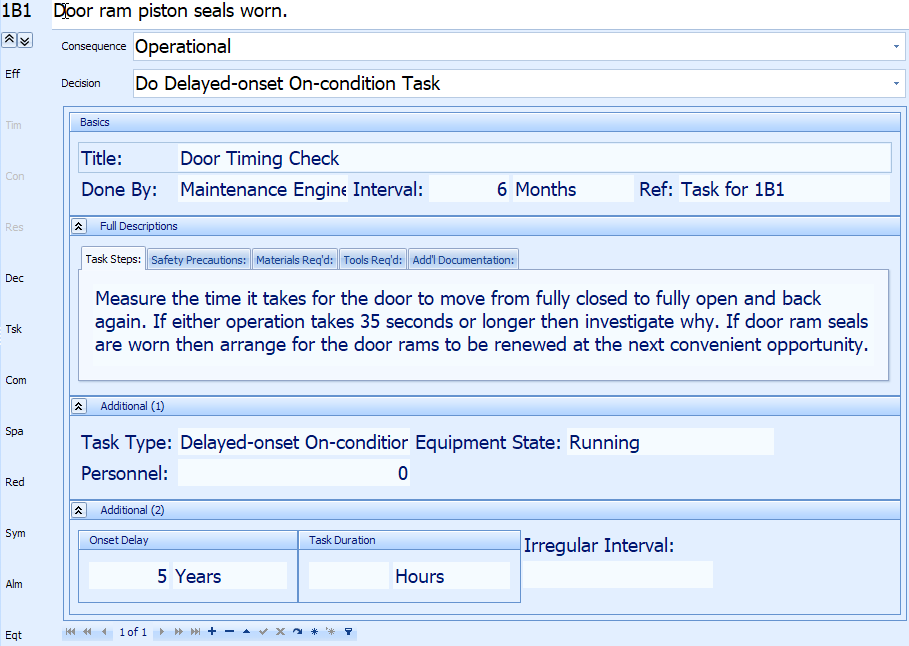
More than one task per failure mode can be created if the decision logic used for the analysis permits it (otherwise only one task per failure mode is permitted). Each new task is automatically assigned a system-created reference but this can be changed to anything you like in order to be compatible with your CMMS. RCM Desktop makes it easy for the facilitator to enter this information live during the analysis meetings. |
|
The following fields are available in the Advanced Edition and above:
- Title: free-text field to hold a short but descriptive title for the Task (up to 255 characters).
- Done By: skill required to do the task; choose from the drop-down list of skills or enter a new one (new ones are automatically added to the drop-down list) (up to 30 characters).
- Interval: how often the task is done; enter a number in the Interval field and press the tab key; choose from the drop-down list of units (years, months, etc).
- Onset Delay: use this field for "Delayed-onset On-condition" tasks; it states the amount of time that the equipment is in service before the On-condition task is done for the first time.
- Irregular Interval: use this field if the task interval is not a regular amount of time or if some irregular event triggers the task; for example "10000 miles" or "After every hurricane" (up to 30 characters)
- Duration: how long the task takes; enter a number in the Duration field and press the tab key; choose from the drop-down list of units (years, months, etc);
- Equipment State: what state the equipment should be in when the task is done (eg stopped or running); choose from the drop-down list of equipment states or enter a new one (new ones are automatically added to the drop-down list) (up to 30 characters).
- Task Type: type of task (eg on-condition, restoration); choose one from the drop-down list (you cannot add any new types); this field may already be filled in automatically if you have already completed the Decision field for the failure mode to which this task belongs.
- Full Description: free-text field for a fully-detailed description of the task and how to do it (up to 7500 characters).
- Safety Precautions: free-text field for specifying any safety precautions that should be taken when doing the task (up to 2500 characters).
- Materials Required: free-text field to list any materials required to do the task (up to 1500 characters).
- Tools Required: free-text field to list any tools required to do the task (up to 1500 characters).
- Additional Documentation: free-text field to list any additional documentation that should be referred to in order to do the task (up to 1500 characters).